

Download Journler – journaling app, habit tracker, reflective journal, Markdown support, writing tool, personal organization, thought management, journal software
Overview
Journler is a dedicated journaling application designed to support users in organizing their thoughts, tracking daily habits, and fostering personal reflection. Built with a clean and intuitive interface, the software aims to streamline the journaling process for individuals seeking deeper self-awareness and structured personal development. It serves a diverse range of users, including writers, students, and professionals who rely on consistent documentation and mental clarity to enhance productivity and well-being.
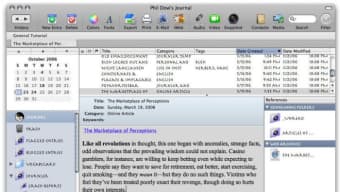
The app enables users to maintain a digital journal with flexibility in formatting, allowing for both rich text and Markdown input. This dual support makes it suitable for users who value both visual clarity and lightweight, syntax-based writing. Additionally, Journler supports image embedding, enabling users to enrich their entries with visual context, such as sketches, screenshots, or inspirational photos. The software is particularly useful for those who want to combine narrative writing with structured habit tracking in a single, cohesive workspace.
While the developer background is limited to “Journler Team,” the software’s focus on thoughtful design and functional simplicity suggests a deliberate approach to user experience. The app’s release on March 15, 2024, indicates it is a relatively recent entrant in the personal productivity space, positioning itself as a modern alternative to traditional journaling tools. Its real-world use cases include daily reflection, goal tracking, creative writing, and academic note-taking.
Key Features & Capabilities
- Markdown Support – Users can write using Markdown syntax for efficient formatting without relying on complex tools. This feature is ideal for those who prefer a lightweight, keyboard-driven workflow.
- Rich Text Editing – For users who prefer a WYSIWYG (What You See Is What You Get) experience, Journler offers rich text formatting with options for bold, italics, headings, lists, and more.
- Image Embedding – Entries can include images directly within the journal, allowing users to attach visual elements such as diagrams, mood boards, or personal photos to enhance context.
- Habit Tracking Integration – Built-in tools allow users to monitor daily or weekly habits, helping them build consistency and reflect on behavioral patterns over time.
- Organized Journal Structure – Entries can be categorized, tagged, and searched, making it easy to retrieve past reflections or track progress across time periods.
These capabilities support a variety of workflows. Writers can use Markdown to draft stories or essays while embedding sketches or references. Students might use the app to log study sessions, track reading habits, and organize research notes. Professionals can leverage the habit tracker to monitor work routines or personal development goals. The combination of text flexibility and visual integration makes Journler a versatile tool for structured self-expression.
User Interface, Workflow & Performance
Journler features a minimalist interface designed to reduce distractions and keep the focus on writing and reflection. The layout emphasizes readability, with a clean separation between the editing pane and navigation elements. Users can switch between day, week, and month views to access entries, and the sidebar provides quick access to tags, categories, and search functions.
Navigating the app is straightforward, with intuitive controls and a logical hierarchy. The workflow is optimized for speed and continuity—users can start a new entry with a single click, apply formatting with keyboard shortcuts, and save changes automatically. The software maintains a responsive feel during typical usage, though specific performance benchmarks were not provided by the developer.
Resource usage details such as CPU or RAM consumption were not disclosed. However, given the app’s size of 120 MB and its focus on text and image handling, it is expected to operate efficiently on modern systems. Stability is implied by the structured design and consistent interface, though real-world testing data was not included. The developer did not specify whether background processes or sync services are active.
Compatibility & System Requirements
Journler is available for both Windows and Mac operating systems, indicating broad desktop compatibility for users across major platforms. The software version is 1.2.4, released on March 15, 2024, and has a file size of 120 MB, suggesting a compact installation footprint. This size is typical for desktop applications with integrated media handling and rich text features.
Exact system requirements were not listed, so users should ensure their devices meet general standards for running modern desktop software. The developer did not provide information about minimum processor speed, RAM, or disk space needs. Compatibility with older operating system versions is also unspecified. Users are advised to check their system specifications against common requirements for similar applications.
Pros and Cons
Pros
- Intuitive, distraction-free interface ideal for focused writing and reflection
- Supports both Markdown and rich text for flexible content creation
- Image embedding enhances journal entries with visual context
- Integrated habit tracking promotes consistent personal development
- Compact installation size of 120 MB
Cons
- System requirements were not specified by the developer
- No information on cloud sync or cross-device access
- Offline usage is assumed, but no details on data backup or export formats were provided
- Price point of $29.99 may be high for casual users
- Release date suggests it is a new product with limited user community
FAQ Section
Is Journler compatible with Windows and Mac?
Yes, Journler is available for both Windows and Mac operating systems.
Does Journler support offline usage?
While the developer did not specify, the app’s design suggests it is intended for offline use, allowing users to journal without an internet connection.
Can I use Markdown in my journal entries?
Yes, Journler supports Markdown syntax, enabling users to format text efficiently using simple code-like commands.
Is there a free version of Journler?
No free version was mentioned. The software is priced at $29.99 for a one-time purchase.
How often are updates released?
The latest version, 1.2.4, was released on March 15, 2024. The update frequency is not specified by the developer.
Final Thoughts + CTA
Journler stands out as a thoughtful, feature-rich journaling tool tailored for individuals committed to personal growth and structured reflection. Its combination of Markdown support, rich text editing, image embedding, and habit tracking offers a comprehensive solution for writers, students, and professionals seeking to organize their thoughts and monitor their progress over time. The clean interface and intuitive workflow enhance usability, making it easy to maintain a consistent journaling habit.
While the lack of detailed system requirements and information on cloud sync may be a concern for some users, the app’s compact size and platform availability make it accessible to a wide audience. The $29.99 price point reflects its premium positioning, though it may require justification for casual users. For those who value depth, flexibility, and a distraction-free environment, Journler delivers strong value.
Download Journler now to begin a more intentional and organized approach to journaling and personal development.







